
Metric <-> Imperial <-> Metric
|
|
| Home | |
| Equivalents | |
| Internet Glossary |

This script can be used to calculate some bitwise operators
| The
Bitwise Operators
The bitwise operators are similar to the logical operators, except that they work on a smaller scale -- binary representations of data. The following operators are available:
Note Both operands associated with the bitwise operator must be integers.
Bitwise operators are used to change individual bits in an operand. A single byte of computer memory-when viewed as 8 bits-can signify the true/false status of 8 flags because each bit can be used as a boolean variable that can hold one of two values: true or false. A flag variable is typically used to indicate the status of something. For instance, computer files can be marked as read-only. So you might have a $fReadOnly variable whose job would be to hold the read-only status of a file. This variable is called a flag variable because when $fReadOnly has a true value, it's equivalent to a football referee throwing a flag. The variable says, "Whoa! Don't modify this file."
When you have more than one flag variable, it might be more efficient to use a single variable to indicate the value of more than one flag. The next example shows you how to do this. Example: Using the &, |, and ^ Operators The first step to using bitwise operators to indicate more than one flag in a single variable is to define the meaning of the bits that you'd like to use. Figure 5.1 shows an example of 8 bits that could be used to control the attributes of text on a display.
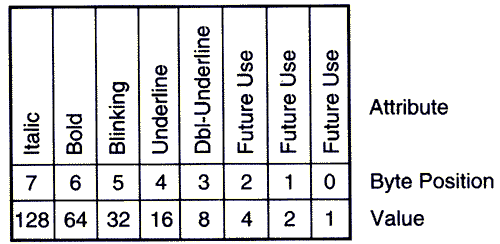
The bit definition of a text attribute control variable
If you assume that $textAttr is used to control the text attributes, then you could set the italic attribute by setting $textAttr equal to 128 like this:
$textAttr = 128;
because the bit pattern of 128 is 10000000. The bit that is turned on corresponds to the italic position in $textAttr.
Now let's set both the italic and underline attributes on at the same time. The underline value is 16, which has a bit pattern of 00010000. You already know the value for italic is 128. So we call on the OR operator to combine the two values.
$textAttr = 128 | 16;
or using the bit patterns (this is just an example-you can't do this in Perl)
$textAttr = 10000000 | 00010000;
You will see that $textAttr gets assigned a value of 144 (or 10010000 as a bit pattern). This will set both italic and underline attributes on.
The next step might be to turn the italic attribute off. This is done with the EXCLUSIVE-OR operator, like so: $textAttr = $textAttr ^ 128; Example: Using the >> and << Operators
The bitwise shift operators are used to move all of the bits in the operand left or right a given number of times. They come in quite handy when you need to divide or multiply integer values.
This example will divide by 4 using the >> operator.
$firstVar = 128;

$secondVar = $firstVar >> 2;

print("$secondVar\n");
Here we
The program produces the following output:
32
Let's look at the bit patterns of the variables before and after the shift operation. First, $firstVar is assigned 128 or 10000000. Then, the value in $firstVar is shifted left by two places. So the new value is 00100000 or 32, which is assigned to $secondVar.
The rightmost bit of a value is lost when the bits are shifted right. You can see this in the next example.
The next example will multiply 128 by 8.
$firstVar = 128;

$secondVar = $firstVar << 3;

print $secondVar;
The program produces the following output:
1024
The value of 1024 is beyond the bounds of the 8 bits that the other examples used. This was done to show you that the number of bits available for your use is not limited to one byte. You are really limited by however many bytes Perl uses for one scalar variable (probably 4). You'll need to read the Perl documentation that came with the interpreter to determine how many bytes your scalar variables use.
|